
Connect your AI (MCP)
This is Kamra's highlight. Everything staff can do through a governed tool, an agent can do - through the same layer. Prices come from the pricing engine, guardrails and policies apply, and every action lands in the activity ledger with who / what / why. Other PMS products market AI; Kamra ships a real MCP server over the hotel's own APIs.
There are two ways to put an AI to work, and they can run side by side.
How it works
Claude  →  HTTPS /mcp (OAuth as you)  →  Kamra tools  →  pricing engine,
           RBAC, folio rules, night audit, Activity Log
The model never invents a rate or skips a cancellation fee. It calls a tool; the tool refuses if the number is wrong or the role is short. Kamra Agent, the in-app assistant (bring-your-own key), uses the same APIs.
Staff connect as themselves. A front-desk session can quote, book and check in; it cannot change rates or run finance. Unattended jobs (HeyKoala, night scripts) use a service key from Developers.
Who can use MCP
A hotel admin decides, per person, under Settings → AI access (MCP) (/kamra/settings/claude):
| MCP role | What the AI may do for this person |
|---|---|
| No access | Nothing. Sign-in is refused with "Your Kamra user has no MCP access". |
| MCP Read | Look: arrivals, stays, folios, reports, room boards. Every tool that changes data is hidden and refused. |
| MCP Manage | Look and make changes: book, check in, post charges, assign rooms. |
Hotel Admin and IT always have full access.
The MCP role only opens the door. What a tool can see or change is still decided by the person's normal Kamra roles: someone with MCP Manage whose only role is Housekeeping still can't book a room or touch a folio. Nobody can do more through an AI than they can in Kamra itself.
Roles and the switches below are read on every request. A change applies to the person's next tool call: no reconnect, no waiting for a token to expire. (The AI client may keep showing its old tool list until it reloads it, but a refused tool stays refused.)
Sites upgraded from 2.6.19 or earlier: everyone who already had a live Claude connection, or whose API key had made MCP changes, was given MCP Manage so nothing stopped working. Review the list after upgrading.
Property switches
On the same page, for the property you are in:
- AI access over MCP - off means nobody can connect an AI client to this property, and existing connections stop working at once. The site setting
kamra_mcp_disabledstill turns MCP off for every property. - Block write tools - AI clients can look but never change anything here, whatever the person's MCP role.
- Blocked tools - switch off single tools (for example
run_night_auditorvoid_charge) for AI clients. Staff can still do the same thing in Kamra.
The page also lists connected AI clients (who, which client, when it connected and was last used) with Disconnect, and links to every AI action in Activity.
Needs approval in Claude
Every tool tells the client what it does (MCP tool annotations): readOnlyHint for tools that only look, destructiveHint for writes that can't simply be undone (cancel, void, check-out, close folio, night audit), idempotentHint where the same call twice does no more than once, and openWorldHint for tools that message a guest. In Claude's connector settings, leave reads on and set the write tools to Needs approval while your team gets used to it.
1. Connect Claude (the usual path)
Your Kamra site must be public HTTPS - Claude talks to it from Anthropic's cloud, not from the laptop.
- In Kamra open Kamra Agent → Connect your AI.
- Click Connect Claude. Claude opens with this hotel's MCP URL filled in.
- Confirm Add, then sign in to Kamra if asked, pick the property, Allow.
- In a Claude chat, open the + menu → Connectors and enable Kamra.
Then talk in hotel language: "Book Mr. Rao a deluxe Fri-Sun with breakfast, company Acme pays the stay" - it quotes, books, routes billing by the company's rules, and logs everything.
Claude Code (same OAuth, from a terminal):
claude mcp add --transport http kamra https://pms.yourhotel.com/mcpThen /mcp in the session and complete the browser sign-in.
Disconnect from the same Connect panel - that revokes the grant. Claude must sign in again. A hotel admin can disconnect anyone's client under Settings → AI access (MCP).
ChatGPT
ChatGPT connects to the same /mcp URL as a custom connector (it calls them apps or plugins in newer screens, and you may need Developer mode in its advanced settings).
- In ChatGPT, add a new connector / app with the MCP server URL
https://pms.yourhotel.com/mcpand OAuth authentication. Leave client ID and secret empty. - Sign in to Kamra on the page that opens, pick the property, Allow.
Kamra accepts ChatGPT's OAuth callbacks (https://chatgpt.com/connector_platform_oauth_redirect and https://chatgpt.com/connector/oauth/<id>) out of the box. The same MCP roles and property switches apply.
n8n and other clients
Unattended workflows (an n8n agent with nobody to click Allow): use an API key. Give the key's user MCP Read or MCP Manage, then send Authorization: token <api_key>:<api_secret> to /mcp with Streamable HTTP, and X-Kamra-Property: <property> if the user can reach more than one property.
Interactive sign-in from a client Kamra doesn't know by name, such as your own n8n: an IT admin adds the client's exact OAuth redirect address under Settings → AI access (MCP) → Extra sign-in addresses (for n8n, https://<your-n8n>/rest/oauth2-credential/callback). Only https:// addresses, exact match, no wildcards. Then use OAuth with the server URL https://pms.yourhotel.com/mcp.
Localhost and air-gapped sites
If the origin is http:// or *.localhost, Connect Claude is disabled: Anthropic cannot reach you. Use Claude Code against the same /mcp URL on that machine, or the stdio sidecar in mcp/kamra_mcp.py with a personal API key from Developers.
Cloudflare / WAF
Remote MCP requests come from Anthropic's egress range 160.79.104.0/21. If Super Bot Fight Mode is on, allowlist that range on the MCP host or Claude will OAuth successfully and then fail to call tools.
2. Kamra Agent, the in-app assistant (bring your own key)
An optional chat assistant for staff, inside the console.
Enable it: Settings → AI assistant → pick a provider (OpenAI, Gemini, Groq, OpenRouter, Ollama, Azure, or Custom) → paste the key → Test connection → Save.
- OpenAI-compatible only in this form. An Anthropic
sk-ant-…key will fail here on purpose - use Connect Claude (MCP) instead, or put Claude behind the OpenRouter preset. - Gemini uses Google's OpenAI-compatible base URL (
generativelanguage.googleapis.com/v1beta/openai). - Your key, your data. No markup - requests go from your server to your provider.
- Governed: the model only calls Kamra's tools.
- Role-scoped: tools match the signed-in user's roles.
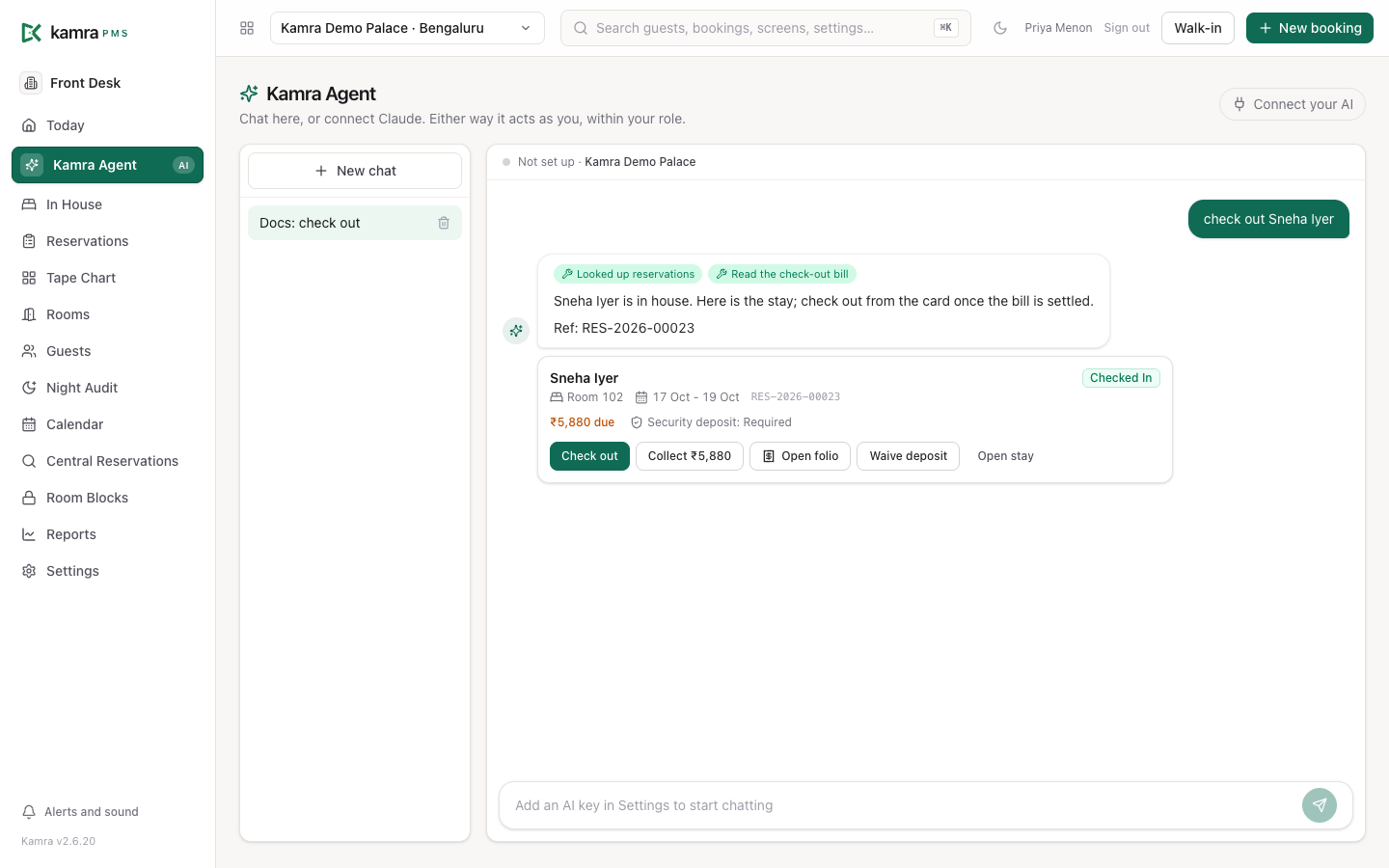
- Cards with actions: under a reply, each stay the agent worked on shows as a card: guest, room, dates, status and what is due, with Check in, Check out, Collect, Open folio, Waive deposit and Open stay. A priced stay shows as a quote card with Book. The buttons open the same sheets as the rest of Kamra, as you; nothing is paid or posted until you finish that sheet.
- Shortcuts: chips above the message box send the common asks in one tap (today's arrivals, departures and balances, in-house guests, a quote, the night audit check).
What work it can do
Kamra ships 116 governed tools on MCP (see the tool reference). Visibility is the intersection of the connected user's roles, their MCP role (Read hides every write), the property's enabled modules and its AI switches - a house without F&B never sees POS tools; Front Desk still cannot change rates.
| Job | Tools |
|---|---|
| Front desk | Today's board, find stays, stay detail, availability, quote, book, waitlist, amend / move, assign rooms to arrivals (preview, then apply), check-in / out, guest lookup and journey, occupants |
| Billing | Folio(s), post / split / move charges, take payment, void, allowance, close folio, payment link |
| Housekeeping | Queue, assign / claim / update tasks, room HK status, minibar / laundry post from the floor |
| Ops | Create, list, and advance service tickets |
| F&B | Outlets, menu, table map, open / create / fire / pay checks, kitchen queue |
| Laundry | Board, rates, collect, status, deliver |
| Revenue | Rate changes inside the owner's floor / ceiling |
| Briefings | Owner briefing, hotel-position briefing - never change the figures |
| Night audit | Idempotent end-of-day posting and no-shows |
| Groups | Draft a block, pickup status, name a guest into the block, group billing |
| Banquets | Availability, catalogue, enquiry → quote → event order → close-out |
| Onboarding | setup_property, import_bookings - only if the user's role allows |
How to talk to it
Say the hotel work, not the API:
- "Who's arriving today, and who still owes?"
- "Assign rooms for tomorrow's arrivals." (
assign_rooms_previewshows the plan;assign_rooms_applywrites the pairs you agree to, checking each again) - "Quote a deluxe Friday to Sunday, two adults, breakfast."
- "Book that for Priya Sharma, 98765 43210."
- "The Rao booking wants to cancel - what's the fee?"
- "Post ₹450 minibar to 214, not alcohol."
- "Do we have the hall on 14 December for 180 pax?"
- "Morning briefing for the owner."
Confirm irreversible steps (checkout with a balance, cancelling inside the window, closing a folio) in the chat before the tool runs.
Keep using it
- Enable the connector per conversation in Claude's + menu. It does not stay sticky across every chat unless you pin it.
- Check Activity in Kamra - every MCP call is a row with your name.
- Rotate access with Disconnect on the Connect panel, not by rotating a Frappe API key.
- Kamra Agent is still there for a desk terminal that should not leave the browser.
Named always-on jobs (a night auditor that runs at 3am, an owner brief on WhatsApp, waitlist chase) are on the backlog below. Until they ship, Claude is the loop: you open a chat, it uses the tools.
Testing Kamra Agent
kamra.scripts.agent_eval talks to Kamra Agent the way staff do: real conversations, the property's own AI provider, then checks on what changed in the PMS. It covers booking without the security deposit, quote then book, check-out that collects what check-out asks for, one charge per bill, cancelling only after a yes, refusing what no tool can do, and role limits. It calls a live AI provider, so it is not part of CI. It runs on the EVAL Hotel sandbox and rolls everything back.
bench --site <site> execute kamra.scripts.agent_eval.execute
bench --site <site> execute kamra.scripts.agent_eval.execute \
  --kwargs "{'only': 'checkout', 'runs': 3, 'model': 'gpt-4o'}"
Models vary from run to run, so use runs to see a pass rate.
Limitations
Be honest with the model, and with buyers:
- Channel / OTA and deep ledger / cashier tools are not on MCP yet (AR aging, FX desk, till open/close). REST + roles still cover them.
- Claude must reach the site. NAT / private bench → stdio fallback.
- Custom connector confirm. Until Kamra is in Anthropic's directory, Claude shows "this URL came from an external link" - click through it.
- Front Desk cannot change rates. Revenue Manager (or admin) can, inside guardrails. Tools the property has disabled never appear.
- Irreversible actions still need a human in the Claude chat. The tools will not phone the guest for you.
The autonomy rails
- Rate guardrails - floors / ceilings per room type; agents literally cannot price outside them.
- Deterministic money - pricing, GST, availability and policy fees are code, verified by the eval suite in CI on every change.
- Hard rules - alcohol never bills to a company folio; cancellations cannot skip the policy; night posting is idempotent.
- Audit - every action is in the Activity Log; click a row for the full before / after story.
Backlog (not in this release)
Kept visible so the differentiator has a next chapter. None of this is required to Connect Claude today.
Named jobs
- Night Auditor - scheduled close + morning WhatsApp, every line a tool call
- Public quote-and-book number (voice)
- Owner Brief - daily occupancy / arrivals / cash
- Villa turnover agent - checkout → housekeeping → availability
- Waitlist chase - poll
waitlist_readyand reach out - Guest WhatsApp thread that posts to the folio
- Public
/try-the-agentplayground with a tool trace - Submit Kamra to Anthropic's Connectors Directory
Tool holes
- Channel manager / OTA sync tools on MCP
- Cashier till open/close, city ledger, FX desk
- Inventory / recipes
- WhatsApp thread → folio from MCP
Housekeeping
[email protected]created on install (today:seed_rbac_v2only)- Tear down dormant autonomy / approvals UI
- STR-shaped MCP (cleaning fee, deposits, access instructions)